APA Citation Style
-
 Publication Manual of the American Psychological Association: The Official Guide to APA Style
Publication Date: 2020Edition: 7th
Publication Manual of the American Psychological Association: The Official Guide to APA Style
Publication Date: 2020Edition: 7th
Publisher: American Psychological Association
Locations & Call Numbers:
MILLS Library Reference (3rd floor) BF 76.7 .P83 2020
THODE Library Quick Reference (Lower Level) BF 76.7 .P83 2020
HEALTH SCIENCES Library Reference (Upper Level) WZ 345 .P976 2020


APA 7th ed. Citation for Business Sources (Google Doc)
Source: Schemm, N., Dellenbach, M., Grisham, Z., Hageman, M., Tingle, N., Trowbridge, M., & Wheatley, A. (2020). APA 7th ed. citation for business sources. https://bit.ly/APA7business
This APA citation guide for business sources was developed by a group of business librarians in the United States and Canada. It is based on the latest edition of the Publication Manual of the American Psychological Association (APA Style, 7th edition, 2020). NOTE: This APA guide has not been modified for local use and includes several sources which are unavailable at McMaster. Read this FAQ for more information about the development and contents of this guide.
Other APA Citation Guides for Business Sources
- Citing Business Sources: APA (7th ed.) Citation Guide (SFU Library)
- Management & Business Sources Citation Style Guide - APA (McGill Library)
- Citing Business Databases & Government Data in APA Format (UNC Greenboro)
See also:
- APA Style (American Psychological Association)
Includes APA style and grammar guidelines, tutorials and a blog which addresses common questions.
- APA Style (7th Edition) (Purdue OWL)
Includes an overview of APA, along with formatting examples for in-text citations, reference lists, a sample paper, and more.
- How to Cite in APA Format (7th edition) | Guide & Generator (Scribbr)
Includes guidelines for paper format, reporting standards, citation examples for many resource types including press releases, reports (PDF), websites and more.
- Infographic: How to Write APA Citations, 7th edtion (McMaster University Libraries)
-
Video: How to Write APA Citations, 7th edition (McMaster University Libraries)
- How to cite ChatGPT (APA Style blog)
Quoting, in-text citations, and references for content generated with artificial intelligence are covered in this blog post.
- How Do I Cite Generative AI - APA (McMaser University Libraries)
Includes examples that incorporate the latest recommendations from this APA Style blog post.
- Iida, P., Ruegg, R., de Boer, M., Araki, N., & Agnello, M.F. (2021). The concise APA handbook: APA 7th edition. Information Age Publishing.
This eBook covers plagiarism, evaluating sources for academic work, in-text citation, making your list of references, formatting and more.
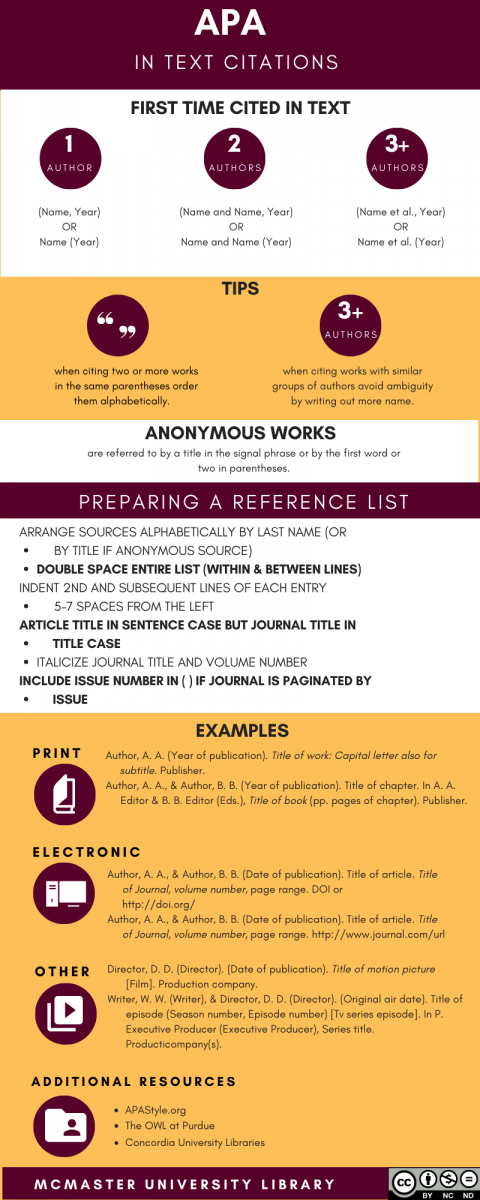
To learn more about citing, visit How Do I Cite?
Citation Managment Software
There are many citation management tools available, both paid and free, all with different strengths and weaknesses.
McMaster Libraries doesn't recommend any specific system, but we do have a citation management software comparison chart to help you choose from these three popular choices:
 EndNote is available to current McMaster employees and students at no cost and consists of a website, browser plug-ins and desktop application (which can be synced across devices & with website). NOTE: A web-based citation management tool called EndNote Basic is free to anyone and has no desktop component. EndNote Basic has less storage and fewer features than EndNote. See this chart for details.
 Mendeley is a free citation management tool that consists of a website, browser extension and desktop application (which can be synced across devices & with website).
 Zotero is a a free citation management tool that consists of a website, browser extension and desktop application (which can be synced across devices & with website).
Guides for each of these citation managers [linked above] are also available to help you through the process of setting up a citation management system, adding references to it from a database, and using it with MS Word to format your bibliography.
If these three options do not meet your needs, you can view a much larger comparison chart on Wikipedia, which includes both free and fee-based alternatives.